Combo vs Clipbot: Best Twitch Clip Tool Comparison (2026)
If you're looking to edit twitch clips upload to TikTok or YouTube shorts, you've probably come across Combo and Clipbot.
Combo is, in my opinion, the most powerful tool for editing clips for TikTok and YouTube. While other tools will make it quick and easy to make simple edits, Combo has the best editor out of all of them.
With Combo's editor, you're able to import clips, images, add text, and shape them however you want. Seriously, Combo is a full-on video editor that's just super optimized for twitch streamers and mobile videos. If I were an editor for a larger streamer, I'd be using combo no question.
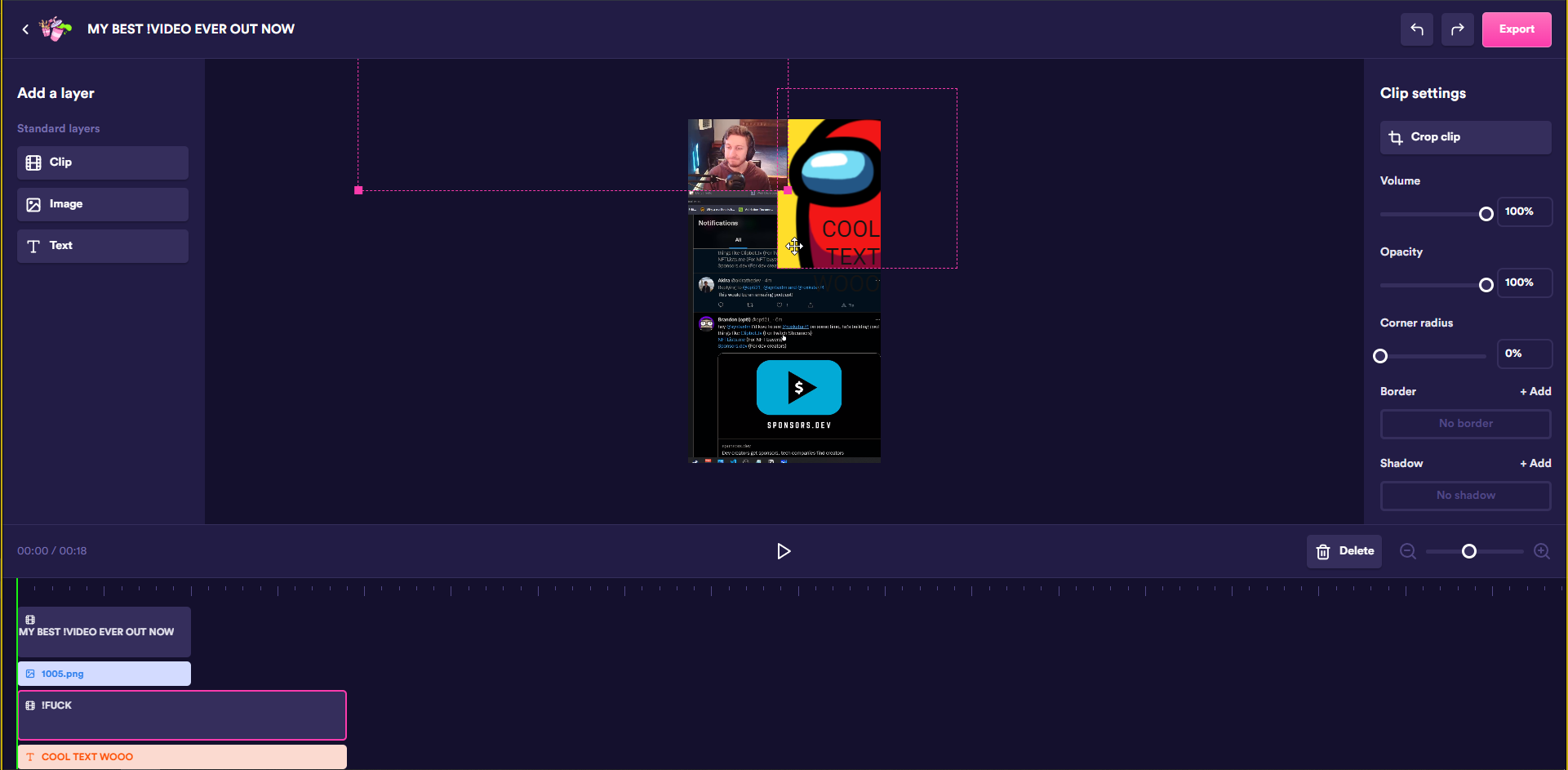
So if you're coming from something like davinci resolve or filmora and still want a lot of control over how your clips look and want to add text/etc, Combo is probably the best tool for you.
On top of all of this, combo lets you make templates per game. This means if you always have the same OBS scene for playing COD, but a different one for Fornite, all your clips can get magically edited with the same template so they always look great!
Combo can actually detect the game you're playing from Twitch to known which template to use, so honestly, it is kinda magic.
And on top of everything, Combo has the Publish To TikTok option. When your video has been edited, with the press of a button Combo can send the video to your TikTok account, where you'll get a notification in the app. From there, just edit the video as normal on TikTok, and publish it.
Although I'm obviously biased, Combo is seriously my favorite tool for twitch clip editing other than Clipbot.
Is there any reason to use anything else?
The only reason not to use Combo is if you want to upload very few clips, or if you don't want the hassle of uploading to YouTube Shorts / adding edits on TikTok.
This is pretty much the only thing that differentiates Combo from Clipbot.
While Combo focuses on giving you really good edits, a really good editor, and quick output of video files, Clipbot focuses on automating simple edits and upload workflows.
In contrast to combo, Clipbot has pretty limited editing. There's only a couple different default crops, one with a cam and one without. But, where Clipbot shines is in automation.
Clipbot doesn't just edit your clips for you, Clipbot automates the YouTube upload and TikTok publishing.
Instead of focusing on making good edits, Clipbot gives you a ton of control over the uploads. You can set custom titles, hashtags, tags, and descriptions for every clip, or just set defaults that Clipbot can use for all of them.
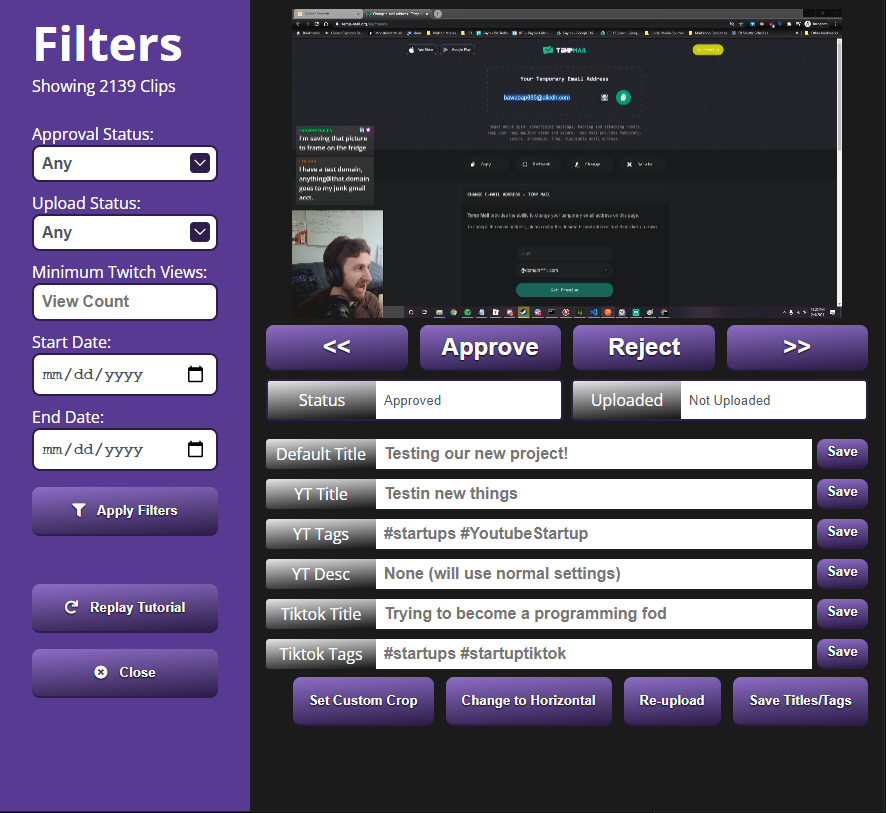
Then, Clipbot processes your approved clips overnight, one at a time. It uploads them to YouTube and publishes them to TikTok automatically.
So what should I use?
As always, it's really a preference.
If you want to make high quality edits on each clip, Combo is absolutely the right tool for you. It's more powerful and functional than any other tool on the market.
If you want to post more simple content, and want the uploading handled for you, Clipbot might be a better choice.
Who should choose which?
Choose Combo if:
- You want full creative control with a powerful video editor
- You're willing to manually handle the TikTok and YouTube upload steps
- You need game-specific templates and advanced customization
Choose Clipbot if:
- You want overnight automation that uploads clips while you sleep
- You prefer simple crops and want to focus on volume over custom edits
- You want direct YouTube and TikTok publishing without manual intervention
Both tools serve different needs in the Twitch clip workflow. If you're also comparing other automation tools, check out our Clipbot vs Powder comparison or Clipbot vs Sizzle comparison for more context on highlight tools. You can also set up Clipbot with a Nightbot command to capture clips during your stream.
Frequently Asked Questions
Combo vs Clipbot: Which is better for Twitch clips?
It depends on your workflow. Combo is better if you want full creative control with a powerful video editor for custom edits, text overlays, and game-specific templates. Clipbot is better if you want automation that handles simple vertical crops, captions, and overnight uploads to TikTok and YouTube Shorts without manual intervention. Choose Combo for editing power; choose Clipbot for upload automation.
Does Clipbot automatically upload to TikTok and YouTube Shorts?
Yes. Clipbot processes your approved clips overnight and automatically uploads them to YouTube and publishes them to TikTok. You can set custom titles, hashtags, tags, and descriptions for each clip, or configure default settings that Clipbot applies to all uploads. This distinguishes Clipbot from Combo, which focuses on editing and requires you to handle uploads manually.
Is Combo better for manual editing?
Yes. Combo provides a full video editor optimized for Twitch streamers and mobile videos. You can import clips, add images, text, shapes, and customize every detail. Combo also supports game-specific templates that automatically apply based on what you're playing. If you need advanced editing capabilities, Combo is the stronger tool. Clipbot offers only simple vertical crops and auto-captions.
Can I use Clipbot without heavy editing?
Yes. Clipbot is designed for simple, automated workflows. It crops your Twitch clips vertically with or without cam, adds auto-captions, and uploads them to TikTok and YouTube Shorts. You don't need editing skills or time-intensive customization. Clipbot handles the tedious tasks overnight so you can focus on streaming.
How do I start with Clipbot?
Sign up at Clipbot.tv for a 7-day free trial. Connect your Twitch, TikTok, and YouTube accounts, select which clips to approve, and set your upload preferences (titles, hashtags, descriptions). Clipbot will process and upload your clips overnight. You can also connect Clipbot to Nightbot to create clips with a chat command during your stream.
Conclusion
Read more about Combo: JoinCombo.com Read more about Clipbot: Clipbot.tv
Ready to try Clipbot's automated workflow? Get started for free.